
Timeero Review
The three per-user plans, the 10-user cap on Basic, the add-ons and renewal clause that change the bill, and crew costs next to busybusy, Workyard, Connecteam and QuickBooks Time.

Timeero is a good GPS time clock for field crews in 2026 when you want GPS, mileage and break tracking at a per-user price with no base fee. Pro, the plan most crews need for geofencing, job tracking and payroll integrations, is $7.50 per user a month billed annually or $9 month to month, read on the Timeero pricing page on 9 November 2026.
Two limits shape the decision. Basic stops at 10 users and leaves out geofencing and integrations, and the Timeero terms let renewal prices rise by up to 15% a year. A crew of 30 or more that only needs a clock may pay less on a flat-rate plan such as Connecteam's.
Key factsBest for: Mobile service crews of 10 to 25 that need GPS, mileage and…
- A GPS time clock with mileage tracking, priced per active user with no account fee.
- Plans: Basic, Pro and Premium are priced per active user, and Enterprise is quoted by sales
- Billing: Annual billing works out to two months free against paying month to month
- User cap: Basic stops at 10 users, while Pro and Premium have no user limit
- Trial: A 14-day trial needs no credit card, and there is no free plan afterwards
Pros
- GPS, mileage and break tracking are on Basic, the cheapest plan, at $5 per user billed annually.
- No base fee, so a 15-person crew on Pro pays $112.50 a month billed annually.
- Deactivated users are not charged, which suits seasonal crews.
Cons
- Basic caps at 10 users and lacks geofencing, scheduling and payroll integrations.
- Renewal prices can rise up to 15% a year, and the cap falls away if you cut licenses.
- Fees are non-refundable and plans cannot be paused.
Timeero sells one idea to field businesses: know where the crew was while it was on the clock, and pay mileage from the same record. Its pricing is simpler than most rivals', with one per-user rate per plan and no account fee, but the plan you need is rarely the cheapest one.
Toolradar data: Toolradar, the software directory we run, tracks 115 time tracking tools as of 8 November 2026, and the median cheapest paid plan across the 59 that publish a price is $8.50 a month, per its time tracking ranking. Timeero's Basic and Pro rates on annual billing both sit under that median, which is unusual for a tool that includes GPS on its entry plan.
This review prices every Timeero plan for an 8-person, a 15-person and a 25-person crew, reads the billing help pages and the renewal clause, and sets the totals against busybusy, Workyard, Connecteam and QuickBooks Time. Every price comes from the vendor's own page, read in November 2026. HRpresso runs no test lab, so this is a pricing and terms review, not a hands-on test.
What is Timeero?
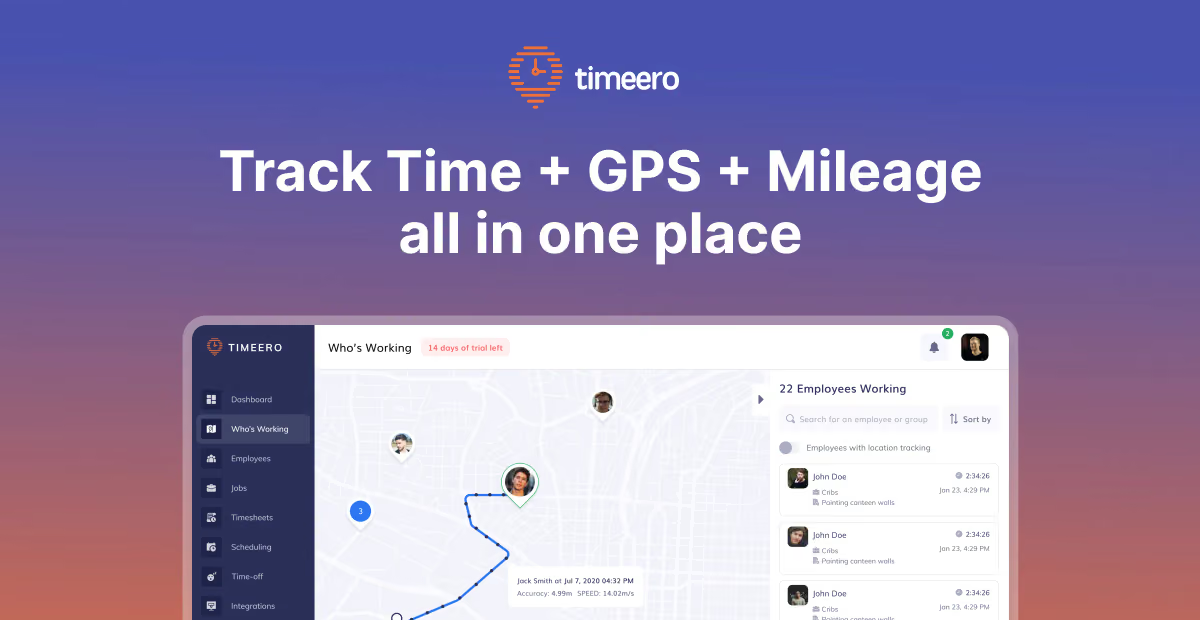
Timeero is a mobile time clock with GPS and mileage tracking for teams that work away from a fixed site. Workers clock in on an iOS or Android app, a web app or a kiosk, and the app records location only while they are on the clock or tracking mileage. Office staff see timesheets, maps and mileage logs, approve them and send them to payroll.
The feature list leans toward compliance. Pro adds a California break policy setting and geofencing; Premium adds Electronic Visit Verification for home care, a facial-recognition kiosk, signatures, custom fields and multi-level approvals. Timeero's help center lists integrations with Gusto, ADP Workforce Now, ADP RUN, QuickBooks Online and Desktop, Xero, Paychex, Paylocity, Paycor, Rippling, BambooHR, Sage Intacct, Sandata EVV and Zapier.
How Timeero works
A trial lasts 14 days and needs no credit card; a card is required to keep using the app after that. Billing is per active user. Timeero's billing help page says the account holder decides who is active, deactivated users are not charged, and changes are prorated. The admin must deactivate seasonal workers, because Timeero charges for every account left active.
The billing cycle changes how added users are paid. On monthly billing a new user appears on the next invoice; on annual billing the card is charged the moment the user is added. Credit from a deactivated user is applied to the next invoice or absorbed by the next user you add, never refunded to the card. Subscriptions cannot be paused, so a crew idle for the winter either keeps paying for active users or cancels and resubscribes.
On the field side, Timeero's FAQ says the app captures a GPS point when a worker moves more than 150 feet or every 5 to 30 minutes depending on the phone's operating system. It works offline and syncs later. Mileage counts only travel faster than 4.47 miles per hour, so walking and standstill traffic are left out, and mileage data is kept for four years.
Timeero key features
Timeero pricing
Timeero lists three self-serve plans on its Timeero pricing page, read on 9 November 2026. Per user per month, Basic is $5 billed annually or $6 monthly, Pro is $7.50 or $9, and Premium is $10 or $12. There is no base fee, Enterprise is priced by sales, and annual billing equals ten months of the monthly rate.
Scenario one, an 8-person cleaning crew on Basic: $40 a month on annual billing, or $480 for the year, against $576 a year paying monthly. Scenario two, a 15-person service crew on Pro: $112.50 a month on annual billing, or $1,350 for the year, against $1,620 paying monthly. Adding Segmented Tracking at its starting rate and Messaging at $2 per user lifts that Pro crew to at least $217.50 a month. All totals are our arithmetic on the printed rates, before tax.
Scenario three, 25 people on Pro billed annually: $187.50 a month. For the same crew, Workyard Starter is $150 billed annually, Connecteam's Operations Expert plan, the tier with breadcrumb GPS tracking, is $99 a month on a yearly plan for the first 30 users, and QuickBooks Time Premium is $270 a month, base fee included, before the QuickBooks Online subscription it requires. busybusy Pro is $9.99 per user billed annually plus a $40 admin license that includes the first user.
Extra costs sit outside the plan rate. SMS notifications cost about $0.02 per message, billed separately from prepaid funds. Timeero's FAQ mentions a one-time onboarding and training fee without giving the amount, so ask for it in writing. The terms also allow a per-GB monthly storage overage fee on accounts with a storage limit.
Methodology: list prices only, no negotiated quotes, applied to each headcount. Rival prices were read the same day on the busybusy, Workyard, Connecteam and QuickBooks Time pricing pages.
| Plan | Price | Best for |
|---|---|---|
| Basic | $5/user/mo billed annually; $6 monthly | Time, GPS, mileage and break tracking for up to 10 users; no geofencing, scheduling or integrations. |
| Pro | $7.50/user/mo billed annually; $9 monthly | Unlimited users; adds geofencing, auto clock-in and out, job tracking, scheduling, payroll integrations, California break policy, photos. |
| Premium | $10/user/mo billed annually; $12 monthly | Adds time-off management, facial-recognition kiosk, commute and suggested mileage, EVV, public API, signatures, MCP server, multi-level approvals. |
| Enterprise | Contact sales | Dedicated account manager, priority support and custom implementation. |
| Add-ons | Segmented Tracking from $5/user/mo; Messaging $2/user/mo | Both are sold only on Pro and Premium; SMS notifications are billed separately at about $0.02 per message. |
Timeero pros and cons
What we like
- GPS, mileage and break tracking are on Basic, the cheapest plan, at $5 per user billed annually.
- No base fee, so a 15-person crew on Pro pays $112.50 a month billed annually.
- Deactivated users are not charged, which suits seasonal crews.
- Premium adds EVV with a Sandata export for home care agencies.
What could be better
- Basic caps at 10 users and lacks geofencing, scheduling and payroll integrations.
- Renewal prices can rise up to 15% a year, and the cap falls away if you cut licenses.
- Fees are non-refundable and plans cannot be paused.
Who Timeero is for
Buy Timeero if you run a mobile crew of roughly 10 to 25 people that drives between customer sites and needs GPS records, mileage for reimbursement and break compliance in one app. Pro fits most of them. Premium is for home care agencies that must file EVV visits, which few general time clocks handle.
Basic suits a crew of 10 or fewer that wants location proof and mileage without job tracking or a payroll sync. Once you need geofences, schedules or an export to Gusto or QuickBooks, you are on Pro, and the 11th hire forces the move anyway. Crews still testing whether they need GPS at all can weigh it against the options in our Jibble review.
Skip Timeero if your crew is large and only needs punches, because flat-rate pricing gets cheaper per head as you grow; our Connecteam pricing guide shows how that works. Skip it too if job costing by cost code is the main need: construction-first tools in our construction time clock ranking and our ClockShark review go further there.
Best Timeero alternatives
If Timeero is not the right fit, these are the closest options.
| Tool | Best for | Starts at | |
|---|---|---|---|
| Timeero | Mobile service crews of 10 to 25 that need GPS, mileage and break records at a per-user price. | Basic $5, Pro $7.50, Premium $10 per user/mo billed annually | Visit → |
| busybusy | Construction firms that want a free plan for unlimited users and equipment tracking. | Free plan | Visit → |
| Workyard | Contractors who want GPS-verified timesheets and project labor costs in one tool. | Starter from $6/user/mo billed annually | Visit → |
| Connecteam | Growing crews of 20 or more, since one flat price covers the first 30 users. | Free plan · Operations Hub Basic $29/mo on the annual plan · Operation | Visit → |
| QuickBooks Time | Field businesses already on QuickBooks Online that want hours to flow into payroll and invoices. | Free plan · Simple Start $38/mo · Essentials $85/mo · Plus $140/mo | Visit → |


The bottom line
Timeero is worth it for a mobile crew that needs GPS, mileage and break records and wants one per-user price with no account fee. Pro is the default plan, at a rate below the Toolradar median for time tracking tools on annual billing. Basic fits only a crew of 10 or fewer that does not need geofences or a payroll sync.
Pass if you have 30 or more workers who only need to punch in, because Connecteam's flat 30-user price undercuts Timeero's per-user bill at that size, or if job costing by cost code matters more than mileage. busybusy is the pick when a free plan is the priority.
Before signing an annual plan, ask Timeero for the onboarding fee in writing, and note the renewal clause: the price can rise by up to 15% at each renewal, and that cap no longer applies if you reduce licenses. Give written notice at least 30 days before the term ends if you plan to leave. Read our Buddy Punch review for a proof-of-presence clock, the time clock software ranking, the time tracking software ranking, Connecteam on Toolradar and ClockShark on Toolradar.
Cite this: HRpresso, "Timeero Review 2026: GPS Time Tracking Pricing and Limits", November 2026.
Frequently asked questions
Is Timeero a good GPS time clock for field crews in 2026?
How much does Timeero cost?
Does Timeero have a free plan?
Can Timeero raise its price at renewal?
Does Timeero charge for inactive or seasonal workers?
Timeero vs busybusy: which is cheaper?
Sources
Prices and plan details come from each vendor's own pricing page, re-checked by the Toolradar pricing tracker.
- Connecteam pricingchecked Sep 2026
- QuickBooks Time pricingchecked Sep 2026
Some offers on this page may be paid placements or contain affiliate links.
More HRpresso reviews
Buyer guides and software reviews, with prices read from each vendor's own pricing page.
Browse all reviews