
TalentLMS Review
What each TalentLMS plan includes for employee training, how the active-user brackets set the bill, which features wait for Pro, and four LMS to price beside it.

TalentLMS is worth it in 2026 for a small or mid-sized company that wants to launch employee training this month without a sales call. Core is $119 a month billed yearly for up to 40 active users, the free plan covers 5 users with no time limit, and every price is printed on the vendor's page.
The catch is that the HR features most onboarding teams want arrive late on the ladder. Learning paths and custom reports start on Grow, and automations that assign courses to new hires start on Pro, which is $5,388 a year on yearly billing for up to 100 active users.
360Learning is the strongest alternative for a team under 100 people that wants month-to-month terms, and iSpring LMS is the one to price for 100 or more learners.
Key factsBest for: SMB HR teams that want a self-serve training LMS with…
- A cloud LMS billed on monthly logins, with automations and learning paths kept for the upper plans.
- Free plan: The free plan has no time limit and covers up to 5 users and 10 courses.
- Entry paid plan: Core is the entry paid plan, priced for up to 40 active users on its first bracket.
- How users are counted: Paid plans count the unique users who log in each month, not every registered account.
- Yearly discount: TalentLMS says yearly billing saves about 20% against paying month to month.
Pros
- Every paid bracket is printed in USD, from 1 to 40 users up to 1,000, with no demo needed.
- The free plan covers 5 users and 10 courses with no time limit.
- SSO, a custom domain and the API are included from Core, the entry paid plan.
Cons
- Automated course assignment needs Pro, the third paid tier.
- Core caps at 100 users and lacks learning paths and custom reports.
TalentLMS is the LMS an HR generalist finds when the brief is "get onboarding and compliance courses online before the next hiring wave". It is cloud-only, it has a real free plan, and the paid prices sit on a public page in dollars.
That combination is rarer than it should be in this category, where Docebo and LearnUpon both ask for a demo before they show a number.
The question for an HR buyer is not whether TalentLMS is cheap. It is which bracket and which plan your training program will actually land on once you count who logs in each month and which features you need to run onboarding without manual course assignment.
Toolradar data: Toolradar, the software directory we run, tracks 64 LMS tools as of October 19, 2026, on its LMS ranking, and 30% of them are free, freemium or open source.
TalentLMS is listed there as an alternative to 9 other tools, so buyers cross-shop it often.
How we compared: plan prices, user brackets and feature lists were read on the TalentLMS pricing page on October 19, 2026, and each alternative's price was read on its own pricing page the same day.
This review is based on vendor pages, not a product trial. The method is on how we rate.
What is TalentLMS?
A learning management system (LMS) is software that hosts training courses, assigns them to employees and records who finished what. TalentLMS is a cloud LMS built for that job at small and mid-sized companies, from the team that also sells TalentCards for mobile training and TalentHR as an HRIS.
Every plan, including the free one, gets the same core: unlimited storage, SCORM 1.2, Tin Can and cmi5 support, custom user permissions, gamification, integrations and portal customization. Paid plans add unlimited courses, single sign-on (SAML 2.0, LDAP and OpenID Connect), a custom domain with SSL and the API from Core upward.
The AI layer is now a large part of the pitch. TalentCraft, the built-in AI course creator, comes with 5,000 one-time credits on Core and 10,000 credits a month on Grow. Pro adds AI course translation into more than 40 languages, an AI Coach inside courses, and skills-based learning with self-assessments.
TalentLibrary, a catalog of over 1,000 short ready-made courses on soft skills, compliance and onboarding topics, is an add-on on every plan. The pricing page does not print its price, so a team that plans to buy content rather than build it needs a quote for that part of the budget.
How TalentLMS works
Setup starts with a free account and no credit card. An admin builds a course from uploaded files, video, SCORM packages or TalentCraft drafts, groups employees, and assigns training by hand. The free plan stops at 10 courses and 100MB per uploaded file, which is enough to pilot a real onboarding course but not to run a training program.
Billing then depends on activity, not headcount. A paid plan counts the unique users who log in during each month, so a 120-person company that trains 35 people a month can sit inside Core's 1 to 40 bracket.
The pricing page says users above the plan's included limit are charged at a per-user rate, and it prints that rate for Pro only, at $6 per additional user.
The rough edge for HR teams is manual work on the lower plans. On Core, there are no learning paths, no custom reports, no group supervisors and no automations, so an admin enrolls each new hire in each course and pulls completion data from the standard reports.
Grow adds custom reports and 5 learning paths. Pro is the first plan where a rule can enroll a new hire automatically.
Support scales the same way. Every plan, the free one included, gets unlimited email support, while priority email and live chat begin on Pro and phone support is reserved for Enterprise. Guided onboarding packages (Discovery on Core, Starter on Grow, Advanced on Pro) come with yearly billing only.
TalentLMS key features
TalentLMS pricing
TalentLMS prices each plan by the number of active users per month, in USD, with a yearly and a monthly rate printed on the TalentLMS pricing page, read on October 19, 2026. The vendor puts the yearly saving at 20%. Core runs only up to 100 users, Grow goes to 500, Pro has brackets up to 1,000, and Enterprise is quoted from 1,000 users (or from 500 on its flexible-user model). Registered nonprofits get 20% off the annual plan.
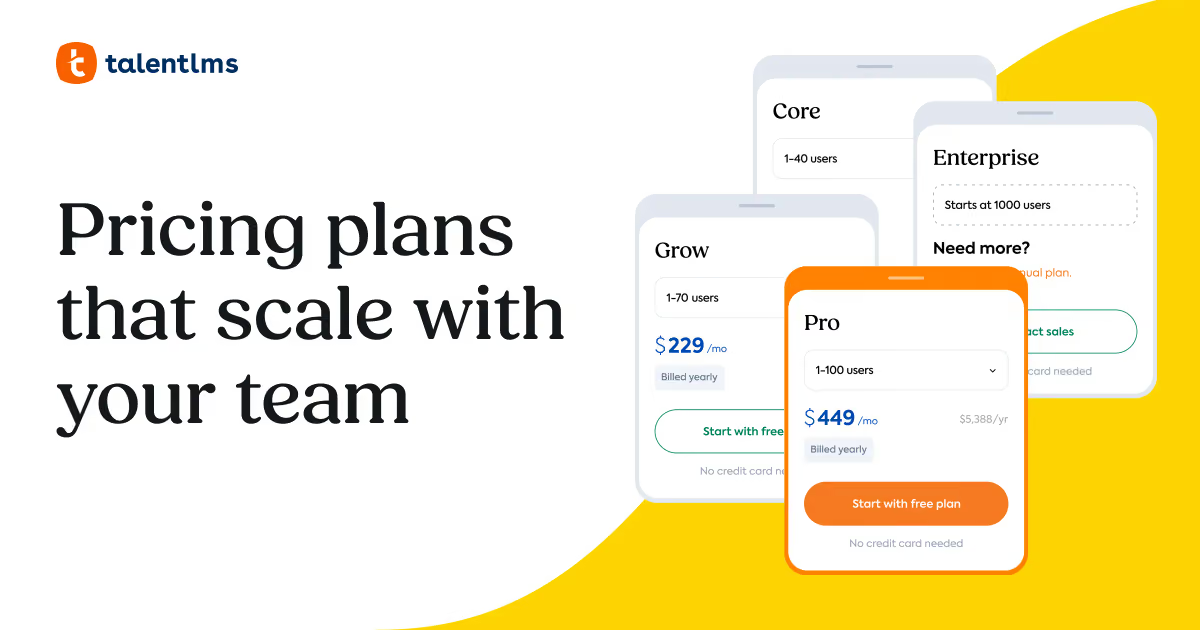
Where costs jump: the move from 40 to 41 active users on Core lifts the yearly Core rate to $159 a month, and 71 to 100 users costs $219 a month. Grow starts at $229 a month for up to 70 users, and Pro at $449 a month for up to 100 users, both billed yearly. Month to month, Core is $149, Grow $299 and Pro $579 at their first brackets.
What you will really pay, by our arithmetic on those printed rates: a 5-person team stays on the free plan. A 20-person company that trains everyone pays $1,428 a year on yearly Core, or $1,788 on twelve monthly Core payments. If that same company needs automated onboarding, Pro on yearly billing is $5,388 a year, close to four times the Core bill for the same 20 people.
Alternatives read the same day: 360Learning prints $8 per user a month on its Team plan, billed monthly with no annual commitment and capped at 100 users. iSpring LMS prints a yearly price of $8,286 for 100 users on Business. Docebo and LearnUpon publish no list price.
| Plan | Price | Best for |
|---|---|---|
| Free | $0 | Up to 5 users and 10 courses, unlimited email support, no time limit, 100MB per uploaded file. |
| Core, 1 to 40 users, yearly | $119/mo ($1,428/yr) | Unlimited courses, 1 branch, SSO, custom domain, API and 5,000 one-time AI credits; no automations. |
| Core, 1 to 40 users, monthly | $149/mo | The same Core features on a month-to-month term, without the guided onboarding package. |
| Core, 41 to 70 users, yearly | $159/mo | The Core feature set for a larger monthly active group; Core stops at 100 users. |
| Grow, 1 to 70 users, yearly | $229/mo ($2,748/yr) | Adds 3 branches, custom reports, analytics, LTI 1.3, 5 learning paths and AI test creation. |
| Grow, 1 to 70 users, monthly | $299/mo | The Grow features month to month, for a team that is still sizing its training program. |
| Pro, 1 to 100 users, yearly | $449/mo ($5,388/yr) | Adds automations, unlimited learning paths, group supervisors, 15 branches, live chat and AI translation. |
| Pro, 1 to 100 users, monthly | $579/mo | All Pro features without a yearly commitment and without the Advanced onboarding sessions. |
| Enterprise | Contact sales | Quoted from 1,000 users, with unlimited branches, phone support and a dedicated account manager. |
| 360Learning Team | $8/user/mo | Billed monthly with no annual commitment, up to 100 users, collaborative course authoring. |
| iSpring LMS Business, 100 users | $8,286/yr | Annual plan for 100 active users; smaller teams are asked to contact sales. |
TalentLMS pros and cons
What we like
- Every paid bracket is printed in USD, from 1 to 40 users up to 1,000, with no demo needed.
- The free plan covers 5 users and 10 courses with no time limit.
- SSO, a custom domain and the API are included from Core, the entry paid plan.
What could be better
- Automated course assignment needs Pro, the third paid tier.
- Core caps at 100 users and lacks learning paths and custom reports.
Who TalentLMS is for
TalentLMS fits an HR or people-ops team at a company of roughly 10 to 300 employees that wants to own its training program without a services contract. It suits onboarding, policy and compliance courses built in-house, and it suits companies where only part of the workforce trains in a given month. Active-user billing rewards that pattern: the bill follows logins, not the size of the payroll.
It is a good first LMS for a team that will start small. The free plan lets an HR lead build a real course for up to 5 people, and Core adds SSO, a custom domain and the API at the entry price, so IT requirements rarely force an upgrade.
It is a weaker fit for a team that wants hands-off onboarding on a Core budget. Automatic course assignment, group supervisors for line managers and unlimited learning paths all wait for Pro. Compare it with the picks in the onboarding software guide if the real need is a first-week checklist rather than courses.
Skip it if a once-a-year compliance push will put every employee in the portal in the same month, since that month sets the bracket. A company with 200 or more learners active every month should also price iSpring LMS, whose per-user rate falls as volume rises, and a deskless team should look at the training hub in the Connecteam review.
Best TalentLMS alternatives
If TalentLMS is not the right fit, these are the closest options.
| Tool | Best for | Starts at | |
|---|---|---|---|
| TalentLMS | SMB HR teams that want a self-serve training LMS with printed prices and a free pilot. | Free for 5 users | Visit → |
| 360Learning | Teams under 100 people that want collaborative course building on a month-to-month term. | Team $8/user/mo billed monthly, up to 100 users | Visit → |
| iSpring LMS | Companies training 100 or more employees that want per-user cost to fall with volume. | Business $8,286/yr for 100 active users | Visit → |
| Docebo | Organizations training 250 or more learners across employees, partners and customers. | Publishes no list price | Visit → |
| LearnUpon | Mid-sized companies that want an LMS with implementation consulting and 24/7 support included. | Publishes no list price | Visit → |




The bottom line
Buy TalentLMS when your HR team wants to launch training on a printed budget and can live with assigning courses by hand for a while. Core's first bracket works out to under $3 per active user a month at 40 learners on yearly billing, by our arithmetic, and the free plan removes the risk of the first course.
Price Pro from the start if onboarding volume is the reason you are buying. Automations, unlimited learning paths and group supervisors only arrive there, and at 20 learners Pro costs close to four times Core on the same yearly term, by our arithmetic. Watch the busiest training month too, because that month's logins set the bracket.
Look elsewhere if you want month-to-month terms with collaborative authoring under 100 users (360Learning), per-user savings above 100 learners (iSpring LMS), or an enterprise program with partner and customer academies (Docebo). The learning management systems guide ranks the wider field, and the free LMS list covers teams not ready to pay.
Cite this: HRpresso, "TalentLMS Review 2026", October 2026.
Frequently asked questions
Is TalentLMS worth it in 2026?
Yes, for a small or mid-sized company that wants a self-serve training LMS with printed prices. The free plan covers 5 users with no time limit, and Core adds unlimited courses, SSO and the API.
It is less of a bargain for a team that needs automated onboarding, because automations start on Pro. Prices were checked on the TalentLMS pricing page on October 19, 2026.
How much does TalentLMS cost?
On yearly billing, TalentLMS Core costs $119 a month for up to 40 active users, Grow costs $229 a month for up to 70, and Pro costs $449 a month for up to 100. Higher brackets cost more, and month-to-month billing raises every rate.
Enterprise is quoted from 1,000 users. The full bracket list is on the TalentLMS pricing page.
Does TalentLMS have a free plan?
Yes. The free plan has no time limit and covers up to 5 users and 10 courses, with unlimited email support and a limited test of the generative AI features. No credit card is needed.
Uploads are capped at 100MB per file on the free plan, against 600MB on paid plans. For other no-cost options, see the free LMS list.
How does TalentLMS count users?
Paid plans count the unique users who log in to the portal each month, not every registered account. A company can register its whole staff and pay only for the bracket its monthly logins fall into.
The pricing page says users above a plan's limit are charged at a per-user rate, and prints that rate only for Pro. Plan the bracket around the busiest training month, such as an annual compliance deadline.
TalentLMS vs 360Learning: which costs less for 30 employees?
TalentLMS costs less if all 30 log in every month. Core on yearly billing covers up to 40 active users for $1,428 a year, while 360Learning Team at $8 a user is $240 a month, or $2,880 over twelve months by our arithmetic.
360Learning has no annual commitment and includes co-authoring, so the gap narrows for a team that values monthly terms. The LMS guide compares both against other options.
Sources
Prices and plan details come from each vendor's own pricing page, re-checked by the Toolradar pricing tracker.
- TalentLMS pricingchecked Sep 2026
Some offers on this page may be paid placements or contain affiliate links.
More HRpresso reviews
Buyer guides and software reviews, with prices read from each vendor's own pricing page.
Browse all reviews