
Timely Review 2026: Automatic Time Tracking Priced per User
Timely's Starter, Premium and Unlimited plans priced per user on both billing cycles, what its private-by-default tracking means for employees, and a 10-person cost against Toggl Track, Harvest, Clockify and RescueTime.

Timely is worth it in 2026 for teams that hate filling in timesheets and can pay a premium for automatic tracking: Premium costs $16 per user a month billed yearly, the same as Toggl Track Premium, while Clockify's Standard plan costs about a third as much. Prices were read on Timely's pricing page on November 9, 2026.
Two limits shape the bill. There is no free plan, only a 14-day trial, and the cheapest plan stops at 5 users and 20 projects, so most teams start on Premium. In return, Timely keeps each person's tracked activity private by default, even from admins, which makes automatic tracking far easier to introduce to employees.
Key factsBest for: Agencies and consultancies that bill time and want…
- Automatic time tracker that drafts timesheets with AI and keeps each person's activity private by default.
- Plans: Timely sells Starter, Premium and Unlimited self-serve, with Enterprise priced by sales.
- Free plan: There is no free plan; a 14-day trial unlocks every feature.
- Starter limits: Starter allows at most 5 users and 20 projects.
- Privacy: Tracked activity is private to each person until they choose to share it.
Pros
- Background capture of apps, documents, websites and meetings replaces timers.
- Activity stays private even from admins, with no screenshots or keystroke logging.
- Premium handles budgets, cost rates and planning for up to 50 users.
Cons
- No free plan, and Premium costs about three times Clockify Standard per seat.
- Starter stops at 5 users and 20 projects, pushing most teams to Premium.
- Features used in the trial vanish if the chosen plan lacks them.
Timely is an automatic time tracker: a background app records which apps, documents, websites and meetings people spend time on, and AI drafts their timesheets from that record. Staff review and approve the draft instead of starting timers or reconstructing a week from memory on Friday afternoon.
Our view: Timely is the easiest automatic tracker to defend to employees, and one of the dearer ones to buy. Its activity record is private to each person until they share it, and Timely says it never takes screenshots or logs keystrokes.
For an HR team rolling out time tracking to consultants or agency staff, that design answers the surveillance objection before anyone raises it.
Toolradar data: Timely is listed as an alternative to 38 tools on Toolradar, the software directory we run, ranking #4 of 115 time tracking tools on that measure, and it has no free plan while 50% of those 115 tools do, as of November 2026.
Toolradar also profiles Toggl Track, Harvest, Clockify and RescueTime.
Methodology: Timely's prices, plan limits and privacy rules come from its pricing page and its privacy page; every rival price comes from that vendor's own pricing page. All were read on November 9, 2026, in US dollars. Team totals are our arithmetic on those printed per-user prices. HRpresso runs no test lab, so nothing here claims hands-on use.
What is Timely?
Timely is an automatic time tracking and timesheet tool sold per user, built for agencies, consultancies and professional services teams that bill or cost their time by project. A background tracker, which Timely calls the Memory tracker, captures work activity; AI timesheets and AutoSheet then turn that record into entries against projects.
Around the tracker sit the tools a manager needs: project dashboards, time or money budgets, billable and internal cost rates, tags, team capacity, overtime and undertime reports, and branded client reports. Integrations cover calendars, Gmail, Jira, Asana, Trello, Zoom and Microsoft Teams, with QuickBooks Online for invoicing.
The privacy model is the part HR should read closely. Timely's privacy page says everything a person tracks starts private, visible to neither teammates, managers nor workspace admins, and that admins cannot override those settings unless the user grants access. Managers see the hours people log to projects, not the raw activity behind them.
How Timely works
Each employee installs the tracker, and Timely records their working day in the background. At the end of the day or week, AI drafts timesheet entries from that record, and the person edits, accepts and logs them to projects.
The time saving is on the employee side: Timely pitches Starter as finishing timesheets in 10 minutes, which is the vendor's own claim rather than a measured result.
Managers then work from the logged hours. Premium adds team management, budgets and costs, planning and syncs with project management and accounting tools. Unlimited adds capacity reporting, overtime and undertime tracking, Azure user management and 50+ currencies, which matters once a firm bills clients in several countries.
Every plan can be trialled for 14 days with all features unlocked, which is long enough to run one full timesheet cycle with a pilot team. When the trial ends, Timely keeps the tracked data, but anything used during the trial that is not in the chosen plan disappears, so check which tier holds the features your managers relied on before you subscribe.
Timely key features
Timely pricing
| Plan | 10 users, yearly billing | 10 users, monthly billing for 12 months | Automatic tracking |
|---|---|---|---|
| Timely Premium | 1,920 | 2,400 | Yes |
| Timely Unlimited | 2,640 | 3,360 | Yes |
| RescueTime Team+ | 1,920 | 2,160 | Yes |
| Toggl Track Premium | 1,920 | 2,880 | Timers |
| Toggl Track Starter | 1,080 | 1,440 | Timers |
| Harvest Teams (from) | 1,080 | 1,320 | Timers |
| Clockify Standard | 658.80 | 838.80 | Timers |
| Plan | Price | Best for |
|---|---|---|
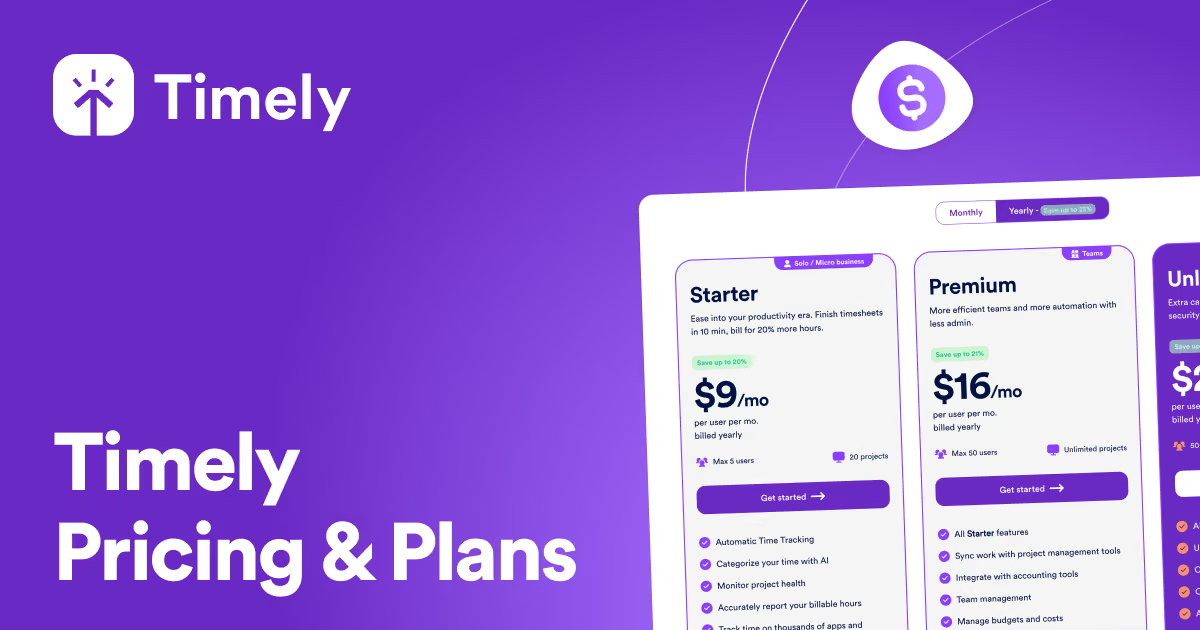
| Timely Starter | $9/user/mo billed yearly; $11 monthly | Automatic tracking, AI categorization, billable hours reporting, up to 5 users and 20 projects |
| Timely Premium | $16/user/mo billed yearly; $20 monthly | Unlimited projects, up to 50 users, team management, budgets and costs, planning, PM and accounting syncs |
| Timely Unlimited | $22/user/mo billed yearly; $28 monthly | Unlimited users, capacity reporting, overtime and undertime, Azure user management, 50+ currencies |
| Timely Enterprise | Contact sales | Tailored onboarding, team training, monthly or quarterly reviews, priority support |
| Toggl Track Starter | $9/user/mo billed yearly; $12 monthly | Billable rates, team reports, timeline views, PTO and public holidays |
| Toggl Track Premium | $16/user/mo billed yearly; $24 monthly | Timesheet approvals, labor cost and profitability reports, fixed fee projects, SSO |
| Harvest Teams | From $9/seat/mo billed yearly; from $11 monthly | Unlimited seats, team reporting, invoicing, Stripe, QuickBooks Online and Xero integrations |
| Clockify Standard | $5.49/seat/mo billed yearly; $6.99 monthly | Timesheet approvals, time off and expenses on top of the Basic administration features |
| RescueTime Team+ | $16/user/mo billed yearly; $18 monthly | Automatic activity tracking with timesheets and focus features for teams |
Timely pros and cons
What we like
- Background capture of apps, documents, websites and meetings replaces timers.
- Activity stays private even from admins, with no screenshots or keystroke logging.
- Premium handles budgets, cost rates and planning for up to 50 users.
- A 14-day trial unlocks every feature.
What could be better
- No free plan, and Premium costs about three times Clockify Standard per seat.
- Starter stops at 5 users and 20 projects, pushing most teams to Premium.
- Features used in the trial vanish if the chosen plan lacks them.
Who Timely is for
Timely fits agencies, consultancies and professional services firms whose people bill time to clients and lose hours by logging it late.
Automatic capture plus AI-drafted timesheets attacks the real problem, missing and guessed hours, and the private-by-default design makes it easier for HR to sell to staff than tools that capture screenshots.
It also suits people teams that need to watch overtime and capacity without monitoring individuals. Unlimited's overtime and undertime reports and the workspace capacity view give a burnout signal from logged hours, while personal activity stays with the employee.
Compare that approach with our Hubstaff review, where monitoring features sit closer to the center, and the Hubstaff pricing breakdown.
Skip Timely if price per seat decides the purchase. Clockify covers manual timers, approvals and time off for a fraction of the cost, as our Clockify review shows, and the TimeCamp review covers another budget-priced tracker.
Hourly and shift workers clocking in and out are better served by the tools in our time clock software ranking. The wider field is compared in our best time tracking software guide.
Best Timely alternatives
If Timely is not the right fit, these are the closest options.
| Tool | Best for | Starts at | |
|---|---|---|---|
| Timely | Agencies and consultancies that bill time and want timesheets drafted from tracked activity | Starter $11/mo · Premium $20/mo · Unlimited $28/mo · custom-priced pla | Visit → |
| Toggl Track | Teams that prefer timers and want approvals and profitability reports in one tool | Free plan · Starter $12/mo per user · Premium $24/mo per user · custom | Visit → |
| Harvest | Service businesses that turn tracked hours straight into client invoices | Free plan · Teams $11/mo per seat · custom-priced plans too | Visit → |
| Clockify | Budget-conscious employers who need approvals and time off without a premium price | Free plan · Basic $4.99/mo per seat · Standard $6.99/mo per seat · Pro | Visit → |
| RescueTime | Teams that want automatic tracking mainly to protect focus time | Free plan · Solo Focus $9/mo · Team Focus $12/mo per user · Solo+ $15/ | Visit → |


The bottom line
Timely is worth paying for when missing hours cost you real money and staff resist being watched. At its yearly Premium price it matches Toggl Track and RescueTime, and it is the one of the three that drafts timesheets from private activity data, which is the strongest answer to both the accuracy problem and the trust problem.
Teams that only need to log hours, approve them and track time off will pay far less on Clockify, and firms that live on invoices should look at Harvest. Run the 14-day trial with real projects and note which features managers use, since the plan you pick must include them. For related people-ops tools see our PTO tracking software, HRIS for remote teams and tools for an HR team of one guides, and the Jibble review for free attendance tracking. How we review tools is explained on the how we rate page.
Cite this: HRpresso, "Timely Review 2026: Automatic Time Tracking Priced per User", November 2026.
Frequently asked questions
How much does Timely cost in 2026?
Is Timely worth it?
Does Timely have a free plan?
Can managers see what employees do in Timely?
Timely vs Toggl Track: which is cheaper?
Sources
Prices and plan details come from each vendor's own pricing page, re-checked by the Toolradar pricing tracker.
- Toggl Track pricingchecked Sep 2026
- Clockify pricingchecked Sep 2026
Some offers on this page may be paid placements or contain affiliate links.
More HRpresso reviews
Buyer guides and software reviews, with prices read from each vendor's own pricing page.
Browse all reviews